

To my knowledge, i have already discussed all most all the possible ways to hack facebook account. If you did missed that, please read here: Ways to hack facebook account. We have also seen that there is nothing called “facebook hacking Software” or “Facebook hacker software”. All these software’s are fake and spyware, that once installed on your system, will rapidly upload any sensitive data of yours like credit card details or saved passwords to the creators server. Read more here: The Truth behind Facebook Hacking Software.
Here in this post i will be demonstrating how you can hack your friends ‘facebook account’ who is residing far away from you using the Best remote keylogger software “Winspy“.
Keylogging method is the best option for you, when you really want to reveal your victims password and at the same time, you do not want your victim to know about ‘his account being hacked’.
The best part in winspy keylogger is, you need not manipulate or bind the remote installation file with any other file like .mp3 or .jpg. Winspy keylogger will automatically do that for you, as specified. Though some antiviruses like COMODO may flag it as Trogn, In such cases you can always use Crypters to make then undetectable. Read here: Making
Buy It Now: Download “Win-Spy v9.8 Keylogger”
[ * ] After buying, please be sure to note down the “clickbank transaction id”. you will need
it to activate your software.
Features of WinSpy Keylogger:
- Inbuilt Icon changer and Image Binder
- Captures Keystrokes including passwords, chats, websites visited, etc.
- Remote FTP – Upload or download any file from remote PC.
- Added PC Usage or Active Time Report
- Improved Chat Reports – Google Talk Chat, Facebook Chat, MSN Live Chat, etc.
- WebCam Recording with SMS Alert
Tutorial - How to Use Win-spy for "Facebook Hacking"?Step #1: Click Open the Win-spy installation file that you just downloaded and it will start the installation process. You will be asked to register the software using ‘clickbank transaction id‘. Just copy paste the clickbank transaction id that you copied after buying it. (Forgot to copy? don’t worry, head over to your email inbox and check for email from clickbank).

Step #2: Next you will be asked to choose Login details (username & password). So that only you are able to access the software and captured data (keylogs).

Step #3: Once you are done with selecting username and password, the keylogger will then ask you to press and hold 3 keys simultaneously for “login box” to appear.

Step #4: Once you press and hold these 3 keys: Ctrl+Shift+F12, a “Login Box” Box will appear immediately. Now enter your username and password to login to your main control panel.

Step #5: Your control panel will look something like below. This is your main keylogger control panel, where in you can manage everything. Remember this main keylogger will also monitor your PC in completely stealth mode and report everything in your control panel.
(Click to Enlarge)
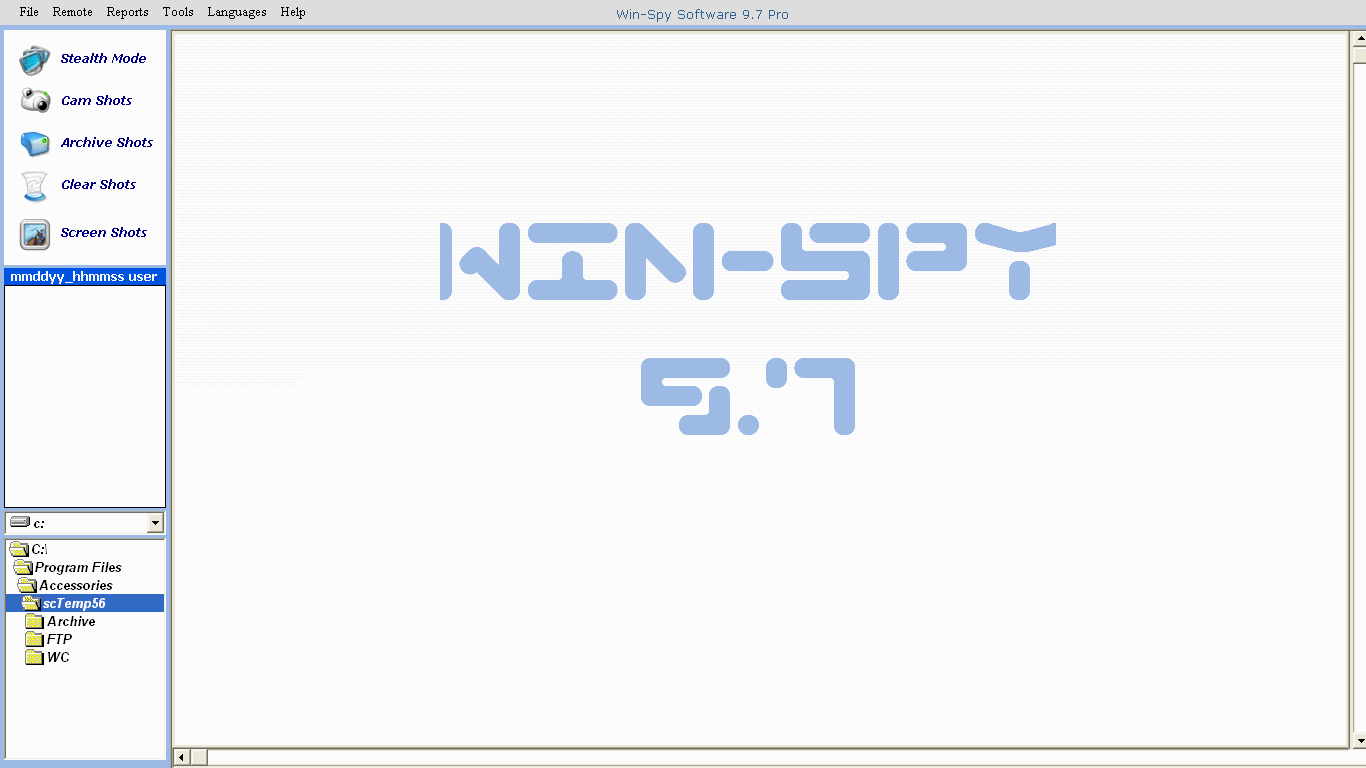
Every time when you restart or reboot your PC, Win-spy keylogger will automatically start monitoring your PC. In case you don’t wish to monitor you PC, Just login by pressing Ctrl+Shif+F12 and click ‘file >> exit‘. Once you logout/exit the program, you cannot login back. To login back, you will need to reboot your PC.
Step #5: Now coming back to our main mission, i.e creating Remote installation file for your victim. To create this installation file for your “XYZ” victim, Just click ‘Remote >> Remote install‘ in your control panel. Here a warning message will pop-up, Just click ‘yes’ and proceed.

Step #6: Now here comes the main Step. Next you will see all the settings and options in you “remote installation file”.

- Fill in the required Fields:

Enter Filename: This is the name of the file you will be sending. A .exe file (or .ppt) with this filename will be created on your desktop. You will be sending this file to the Remote PC. As you will see, there 5 different file extensions you can choose from. The most commonly used and recommended ones are .exe or .ppt formats. If .ppt (powerpoint extension) selected, you might need to update some settings in you office suit. In both .exe or .ppt, you can add image to it. So that when your victim runs it, he will be shown the Image and the keylogger will install in background automatically.
Include Picture: This is the picture remote user will see when they click on the remote file. Supports GIF or JPG formats. If no picture is included then when user clicks on the file it would appear as nothing has happened. Win-Spy will install silently.
File Icon: You can add any icon to your remote installation file. If you have Included image then its recommended that you use image icon.
#tip: To create icon of Image, use this software called Any2Icon. Download here.
Email keylog to: This will be the email address where you would receive win-spy keylog reports. Enter your gmail address in this Email Tab. Its Recommended that you use only gmail email address. Do not change SMTP server settings. Do a “Test” and make sure mail was sent and received. Check your SPAM folder for email if not receiving email.
There are some other optional settings like: screen capture, WebCam, FTP, etc. Just go through and configure as you wish.
Step #7: Once you are done with filling up all the required details, Click on “Create Remote file” Button. This will take some seconds and once it is done, it will then save the installation file on your Desktop.
Step #8: The next Step is to send this file to your victim via email or better send it via facebook messages (as attachment). Make sure you have archived it in a .rar or .zip file, So that online antivirus programs of facebook or email service don’t pick it up as exe file.

It totally depends on you as to how you are going to convince your victim to install it at his end. here you will need a criminal mind to perform this Con. For ex: lets say i am chatting with my victim in facebook messages, suddenly i will send him 1 broken photo link and will ask him to identify any object in the photo. Obviously he will reply that the “link is not working” or “i don’t have permission to access that link“. Then i will attach Zip file containing the keylogger and ask him to download this file to checkout that photo. At his end he will download it, open it and he will see the image on his screen. and by the time he reply you back, the keylogger is already installed on his PC.
Step #9: Once your victim has successfully installed it, you will then get keylogs periodically in your specified Gmail’s “SPAM” folder. You can also use Remote PC viewer in your win-spy control panel to view all your victims activity.
That’s it. Good luck!. If you are facing any problem, do comment below and i will get back to you anytime.
Plz Note:- We hold no responsibility for the keylogger software we have refereed to and We can not guarantee the remote setup will work for everyone. Please do not Misuse it unless its for good reason. Also We claim no legal or moral responsibilities for your actions. Please check your local laws.
Read more: http://www.best4hackingnews.blogspot.com
-"AtulPurohit"


 www.best4hackingnews.blogspot.com


 Posts
Posts


